Ground News Family Plan
The Ground News Family Plan lets you share a Vantage subscription with up to three other people. Each person gets their own account with full access to Vantage. This way, everyone can have their personalized reading experience while you manage everything from one place.
Get Started with the Family Plan
Purchasing a Family Plan
The Family Plan is currently only available for purchase on our website, not through the App Store or Google Play Store. Once you complete your purchase, you will become the plan admin and will be able to invite others to join your family.
Already Subscribed? Upgrade in a Few Clicks
If you already have an individual Ground News subscription, you can upgrade to a Family Plan by following these steps.
Inviting Others to a Family Plan
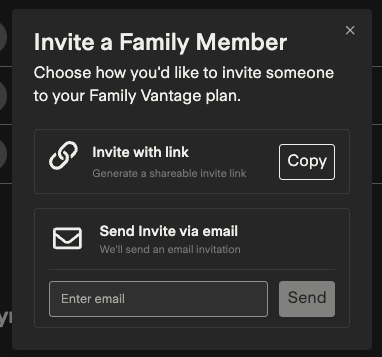
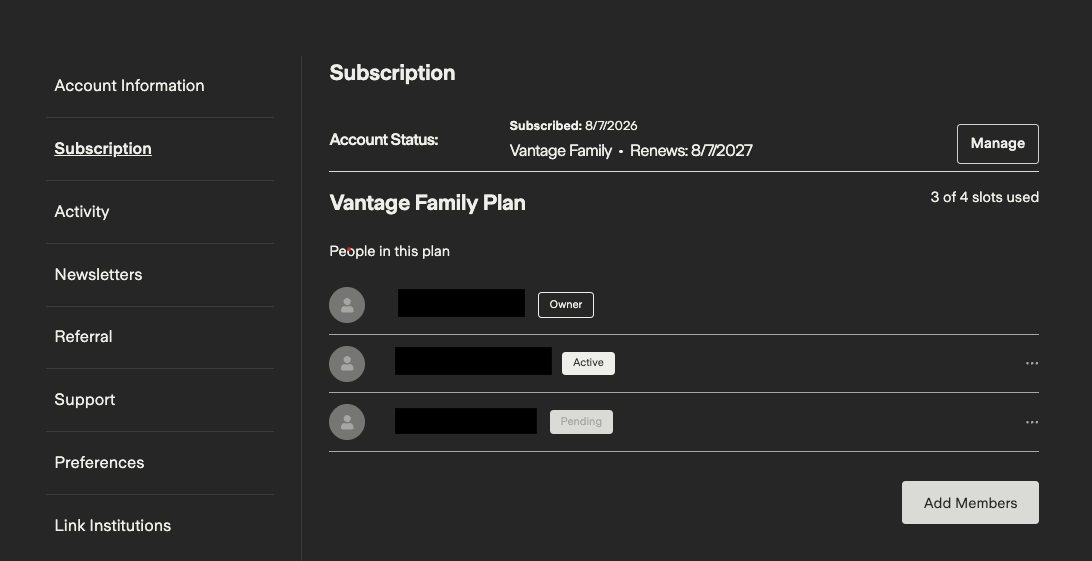
Plan admins can invite up to three people from the My Account > Subscription tab. There are two ways to send an invitation:
Email invite: we'll send an email invitation directly to the members
Shareable link: an invitation link you can copy and share however you like. Invite links expire after 7 days, but you can generate a new one anytime
Invited members will appear as Pending in your member list until they accept.
Accepting a Family Plan Invitation
To accept your invite, the recipient will need to sign in or create a Ground News account. Once that’s done, you’ll see them as Active in your family. That's it - they now have full Vantage access!
Please note that readers who already have a paid subscription or are part of another family will not be able to accept invites. They must either wait for their existing subscription to end, or leave their family in order to join a new one.
Email Invite
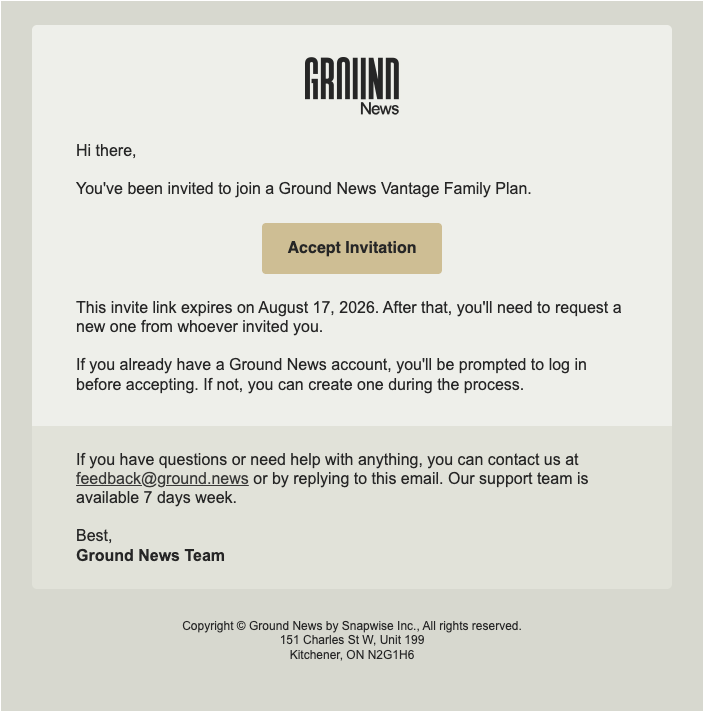
Once you receive an invitation email from an admin, you can click on "Accept Invitation" to join the family plan. Once accepted, your Ground News account will automatically upgrade to Vantage.
Link Invite

If you have received a link invite by the admin, whether through text, email, etc, you can click on "Accept Invitation" to join the family plan. Once accepted, your Ground News account will automatically upgrade to Vantage.
Managing Family Members
Plan admins can remove or replace members at any time. Select the user from the family’s member list and press the “Remove from plan” button. The open slot becomes available immediately, and you can invite someone new right away.
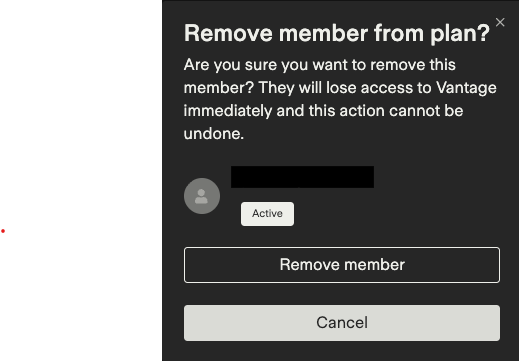
Members who are removed from a family keep their Ground News account and all their data; they simply return to a Free account.
FAQs
How many people can be on a Family Plan?
Four in total - the admin, plus up to three other family members.
Who can I invite?
Anyone! Family, friends, anyone you'd like to share Ground News with.
Why can't someone accept my invite?
If they already have an active paid Ground News subscription, they'll need to wait for it to expire before joining your plan. If they're part of another Family Plan, they'll need to leave it first. And if the link has expired, just send them a fresh one.
Do members share an account?
No - every member has their own account, with their own followed topics, saved feeds, settings, and My News Bias insights.
Is the Family Plan eligible for a free trial or discounts?
No, the Family Plan is not currently eligible for free trials or promotional discounts.
Can I leave a Family Plan?
Yes. You can leave a family at any time from My Account > Subscription. You'll return to a Free account, and your saved feeds, followed sources, reading history, and settings will stay tied to your account.
I purchased a Family Plan, what happens if I cancel?
You'll keep access until the end of your current billing cycle. After that, all members (including the admin) return to Free accounts, and any pending invites will no longer work.
What happens if a member is removed?
They return to a Free account right away, but their saved feeds, followed sources, reading history, and settings stay tied to their account.
Want to check out other options?
Need help using Ground News?
If you have any questions or are experiencing an issue with a feature, setting, or something not working as expected, our team can help investigate and provide support. Learn more about reporting an issue here or email us directly at feedback@ground.news
Need help with your account or subscription?
If you have questions about your account, subscription, billing, or payments, our support team is available to help. You can visit your Account page here or email us directly at subscriptions@ground.news
Help us improve the Help Center
We’re always working to make the Ground News Help Center more helpful for our readers. If you have suggestions for improving this article or notice something that could be clarified, we welcome your feedback at feedback@ground.news Please keep in mind that feedback submitted directly through Help Center article comments is not monitored for support requests, and we encourage you to contact our support team directly so we can assist you.